How to redeem codes in Huss Valley
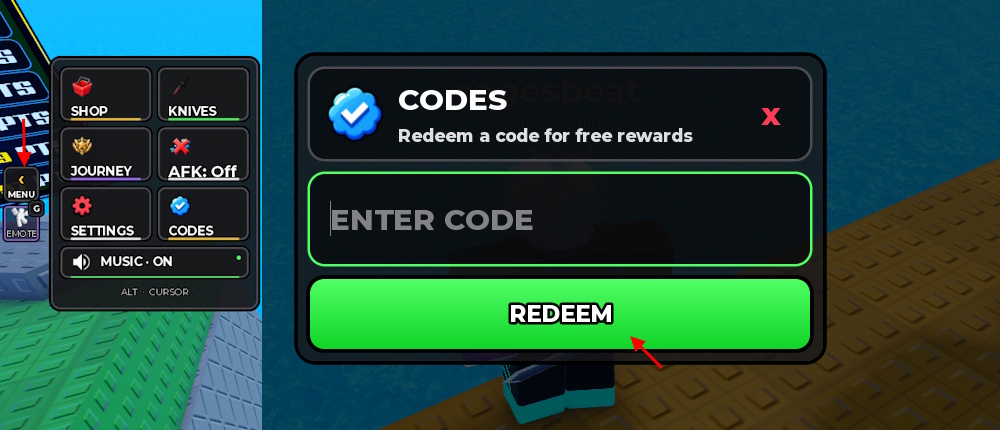
Huss Valley codes screen — screenshot from Beebom (beebom.com), checked 2026-11-24.
- 1
Open Huss Valley on Roblox
Go to roblox.com/games/107535308163741 and press the Play button to join a server. Make sure you are in the main Huss Valley game — not Ve3 Huss Valley or Escape Huss Valley, which use different codes.
- 2
Open the Menu
Once in-game, click the Menu button on the left side of your screen.
- 3
Select the Codes tab
Inside the menu, click the Codes tab.
- 4
Type your code
Enter the code exactly as shown on the codes page. Codes are case-sensitive — include any capitals or punctuation (e.g.
BOSSISHERE!includes the exclamation mark). - 5
Press Redeem
Click the Redeem button. If the code is valid and has not been used before, your reward appears immediately.
Why is my code not working?
- 🔡 Case sensitivity: Enter codes exactly as shown. HUSSYORK ≠ hussyork.
- 🔂 Already redeemed: Each code works once per account.
- 🕹️ Wrong game: Main Huss Valley codes do not work in Ve3 or Escape Huss Valley.
- 📅 Code expired: Check the codes page to confirm it is still active.
- ⌨️ Extra spaces: Make sure you do not paste any leading/trailing spaces.
Sources
Beebom — Huss Valley Codes, 2026-11-22 — beebom.com
Radio Times — Huss Valley codes, 2026-11-23 — radiotimes.com